The VIVO Dual Vertically Stacked Ultrawide Monitor Desk Mount review centers on a specialized setup: two large screens arranged vertically to conserve desk width.
The STAND-V257R offers broad screen-size support, adjustable positioning, and clamp or grommet installation, but its capacity and mounting fit deserve careful checking before purchase.
VIVO STAND-V257R Review Summary
The quick verdict
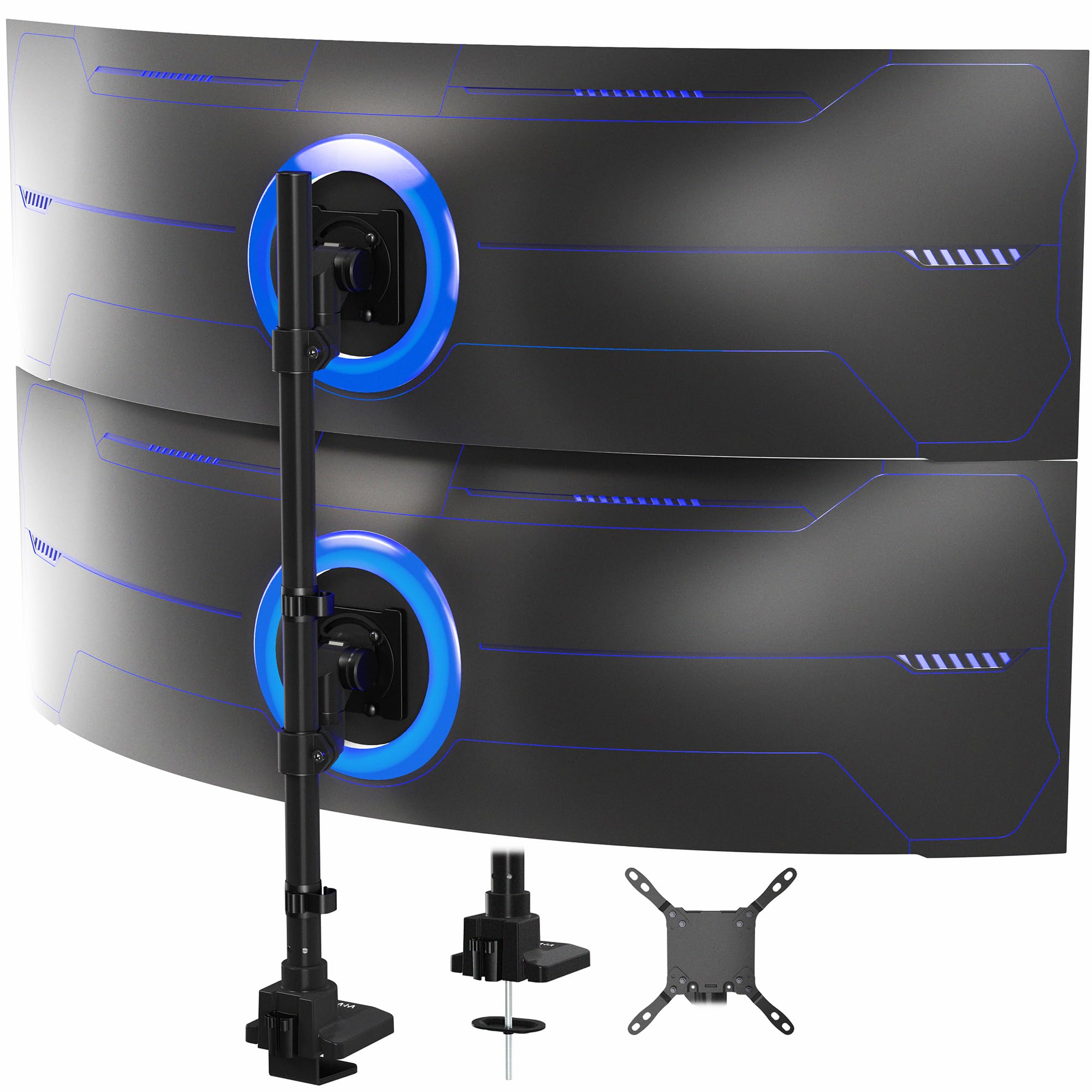
2,000+ ratings
Read Amazon ReviewsVIVO STAND-V257R Dual Ultrawide Monitor Mount
A desk-mounted vertical stand for buyers stacking two large ultrawide screens who need high weight capacity and flexible viewing angles.
- Holds two vertically stacked ultrawide screens, each up to 57 inches.
- Maximum screen weight is listed as 48.4 pounds for curved displays or 59.4 pounds for flat displays.
- The lower arm tilts from +55° to −35°, swivels 132°, and rotates 180°; the top arm swivels and rotates 360°.
- Screen height adjusts along the center pole.

Pros
- Designed specifically for a two-screen vertical ultrawide arrangement.
- Supports displays up to 57 inches and lists different generous weight limits for curved and flat screens.
Consider before buying
- The desk surface must fall within the relatively specific thickness limits for either mounting method.
- The weight allowance depends on whether a display is curved or flat, so buyers need to check both screens individually.
Read the full review summary
The STAND-V257R is designed for people who want to stack two ultrawide displays rather than spread them side by side.
It supports screens up to 57 inches, with a maximum listed weight of 48.4 pounds for curved screens or 59.4 pounds for flat screens.
That makes the weight and screen shape of each display central to checking whether this mount fits your setup.
Its tilt, swivel, and rotation adjustments offer flexibility for dialing in a stacked arrangement, while cable clips along the center pole help route power and AV cords.
The desk attachment is a C-clamp for surfaces up to 1.45 inches thick, or an optional grommet mount for surfaces up to 1.26 inches.
Buyers should also confirm their monitor’s VESA pattern and desk clearance before committing to a tall, vertically arranged system.
The buying factors
VIVO STAND-V257R Scorecard
Editorial scores reflect listed features and buyer fit; they are not laboratory measurements or customer ratings.
Large-screen compatibility
Supports two ultrawide screens up to 57 inches, with separate maximum weight limits for curved and flat displays.
Weight capacity
The listed maximums are substantial for this kind of stacked setup, though each screen must stay within the applicable limit.
Positioning flexibility
Offers tilt, swivel, rotation, and center-pole height adjustment, with different rotation ranges for the upper and lower arms.
Mounting options
C-clamp and grommet installation provide two approaches, but both have specific desk-thickness limits.
VESA coverage
Supports several common patterns, including 75 × 75, 100 × 100, and patterns up to 200 × 200 mm.
Cable organization
Cable clips on the center pole provide a straightforward way to guide power and AV cords.
Key Features and Specifications of VIVO STAND-V257R
- Holds two vertically stacked ultrawide screens, each up to 57 inches.
- Maximum screen weight is listed as 48.4 pounds for curved displays or 59.4 pounds for flat displays.
- The lower arm tilts from +55° to −35°, swivels 132°, and rotates 180°; the top arm swivels and rotates 360°.
- Screen height adjusts along the center pole.
- C-clamp mounting accommodates a surface up to 1.45 inches thick; the optional grommet mount accommodates up to 1.26 inches.
- Detachable VESA plates support 75 × 75, 100 × 100, 200 × 100, 100 × 200, and 200 × 200 mm patterns.
- Cable clips on the center pole help keep power and AV cords organized.
Pros and Cons of VIVO STAND-V257R
Pros
- Designed specifically for a two-screen vertical ultrawide arrangement.
- Supports displays up to 57 inches and lists different generous weight limits for curved and flat screens.
- Offers multiple positioning adjustments, including full rotation on the top arm.
- Includes both clamp and grommet mounting approaches.
- Detachable VESA plates and center-pole cable clips simplify mounting and cord routing.
Consider before buying
- The desk surface must fall within the relatively specific thickness limits for either mounting method.
- The weight allowance depends on whether a display is curved or flat, so buyers need to check both screens individually.
- A vertical layout requires careful planning for viewing height and clearance between the upper and lower display.
Who Should Buy VIVO STAND-V257R?
Good fit
Consider the STAND-V257R if your workspace calls for two large ultrawide monitors stacked one above the other.
This arrangement can reserve more side-to-side desk space than a horizontal dual-screen layout, while the center pole and adjustable arms provide options for positioning the displays.
The ability to rotate the upper arm through 360° may help with setup orientation, while the lower arm has its own tilt, swivel, and rotation range.
Before buying, check the weight and VESA pattern of each monitor, not just its diagonal size.
Apply the appropriate maximum weight for curved or flat screens, confirm each display’s mounting holes match a supported pattern, and measure your desk where the clamp or grommet will attach.
Also consider whether the upper screen can sit at a comfortable height in your intended arrangement.
The cable clips and detachable plates are practical touches for assembling and tidying a complex display setup. The mount is backed by a three-year warranty, which adds a defined coverage period for buyers planning a longer-term workstation.
Who should skip it
Skip this model if you want side-by-side screens, need a freestanding base, or have a desk surface outside the thickness limits for the clamp and optional grommet.
It is also a poor fit if either screen exceeds the applicable weight allowance or lacks a supported VESA pattern.
If your monitors are much smaller or lighter than this mount is built to accommodate, first decide whether the vertical ultrawide layout is a real benefit for your workspace.
Its specialized arrangement may not suit a conventional two-monitor setup where both displays sit at the same height.
How the VIVO STAND-V257R Fits a Stacked Ultrawide Setup
Screen size and weight need to be checked together
The 57-inch maximum describes screen size, but it does not by itself establish compatibility.
Each display also needs to remain under the stated weight limit that applies to its shape, and its mounting holes must match one of the supported VESA patterns.
Checking all three details—size, weight, and VESA spacing—helps avoid choosing a mount based on diagonal measurement alone.
Vertical placement changes the ergonomics
Stacking screens can make better use of a narrow desk, but it places one display above the other and makes viewing height a key part of the setup.
The center-pole adjustment and arm articulation provide positioning choices; before purchase, sketch or measure where each screen will sit relative to your chair and desk.
Desk attachment is a hard fit requirement
The C-clamp is specified for surfaces up to 1.45 inches thick, while the optional grommet mount supports up to 1.26 inches.
Measure the attachment area and check for any edge shape, apron, or obstruction that could interfere with installation before deciding which method is practical.
Adjustments and cable routing support setup refinement
The arms provide distinct movement ranges: the lower arm tilts, swivels, and rotates through its listed limits, while the top arm offers full rotation and swivel. Cable clips on the pole can keep cords guided along the stand.
Together, these features give buyers ways to refine screen orientation and manage wiring after confirming that the desk and displays are compatible.
Alternatives to VIVO STAND-V257R
Computer Monitor Arms alternative
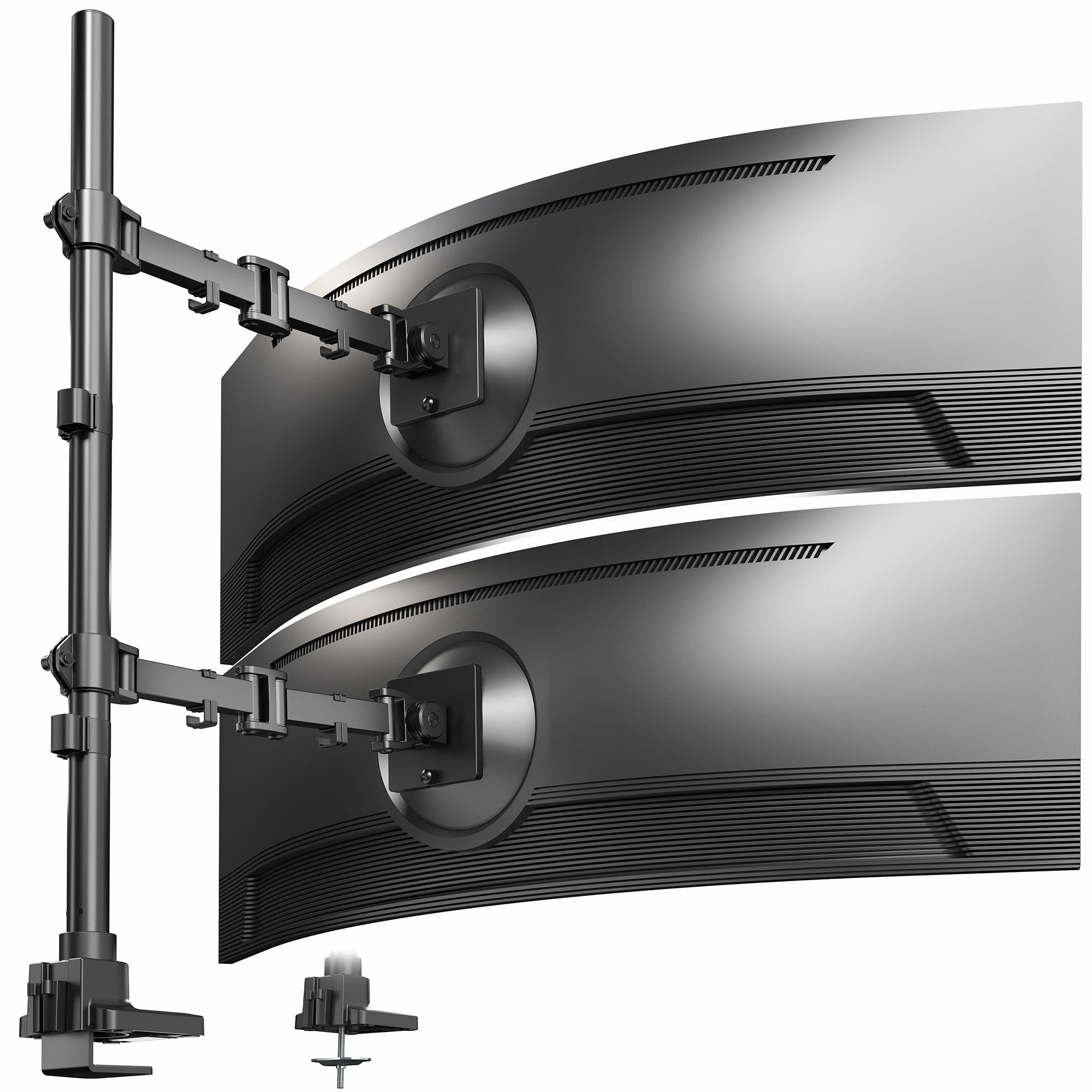
2,000+ ratings
Read Amazon ReviewsVIVO STAND-V120T Dual Ultrawide Monitor Mount
Choose the STAND-V257R when vertical stacking and support for larger screens are the priorities.
Consider the STAND-V120T if your monitors are within its listed size and weight limits and you prefer a dual-arm arrangement instead of the specialized stacked design.
- The STAND-V120T is a dual-arm desk mount for ultrawide screens up to 49 inches and 44 pounds each, with tilt, swivel, rotation, and clamp or grommet installation.
- The STAND-V257R stacks two ultrawide screens vertically, supports sizes up to 57 inches, and includes clamp or grommet mounting.
Computer Monitor Arms alternative
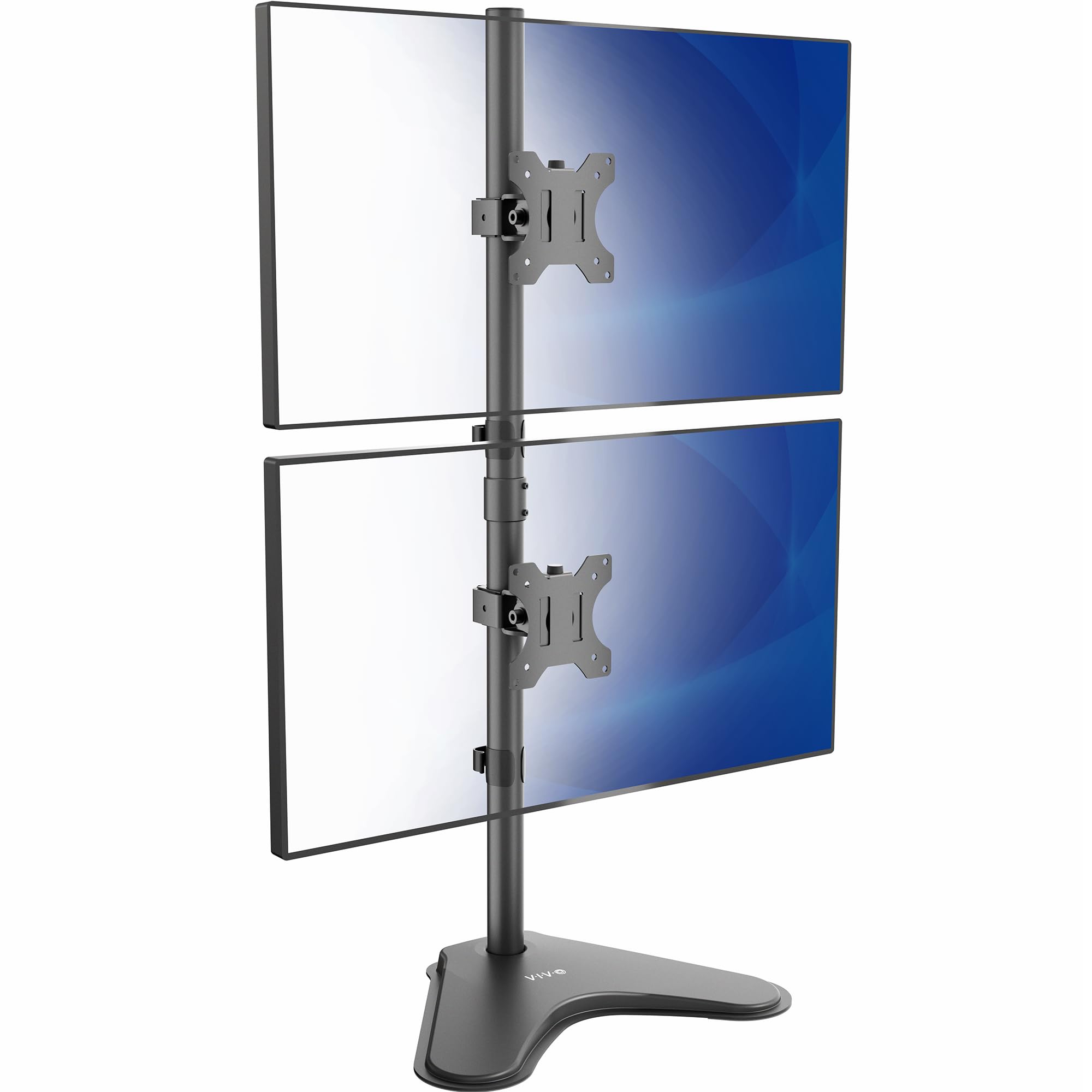
3,000+ ratings
Read Amazon ReviewsVIVO STAND-V002L Vertical Dual Monitor Stand
Consider the STAND-V002L if your displays are smaller and lighter and you want a freestanding base rather than a desk clamp or grommet. The STAND-V257R better suits large, heavy ultrawides and a desk-mounted setup.
- The STAND-V002L is a freestanding vertical stand for two screens from 13 to 34 inches and up to 22 pounds each, with a 15.4 × 12.4-inch base.
- The STAND-V257R is built for two ultrawides up to 57 inches, with substantially higher listed weight limits and clamp or grommet mounting.
Is VIVO STAND-V257R Worth It?
The VIVO STAND-V257R is worth considering when you specifically want two large ultrawide monitors stacked vertically and your screens, VESA patterns, and desk attachment point all fit its limits.
Its broad positioning adjustments, high listed weight capacities, and cable clips make it a purpose-built option for that arrangement.
Measure the desk and verify each screen’s size, shape, weight, and mounting pattern before buying.
If you need a side-by-side or freestanding arrangement, or your screens fall outside the fit limits, this specialized mount is unlikely to be the right choice.
Your review at a glance
2,000+ ratings
Read Amazon ReviewsVIVO STAND-V257R Dual Ultrawide Monitor Mount
A desk-mounted vertical stand for buyers stacking two large ultrawide screens who need high weight capacity and flexible viewing angles.
- Holds two vertically stacked ultrawide screens, each up to 57 inches.
- Maximum screen weight is listed as 48.4 pounds for curved displays or 59.4 pounds for flat displays.
- The lower arm tilts from +55° to −35°, swivels 132°, and rotates 180°; the top arm swivels and rotates 360°.
- Screen height adjusts along the center pole.